
Navigating the Gardyn App
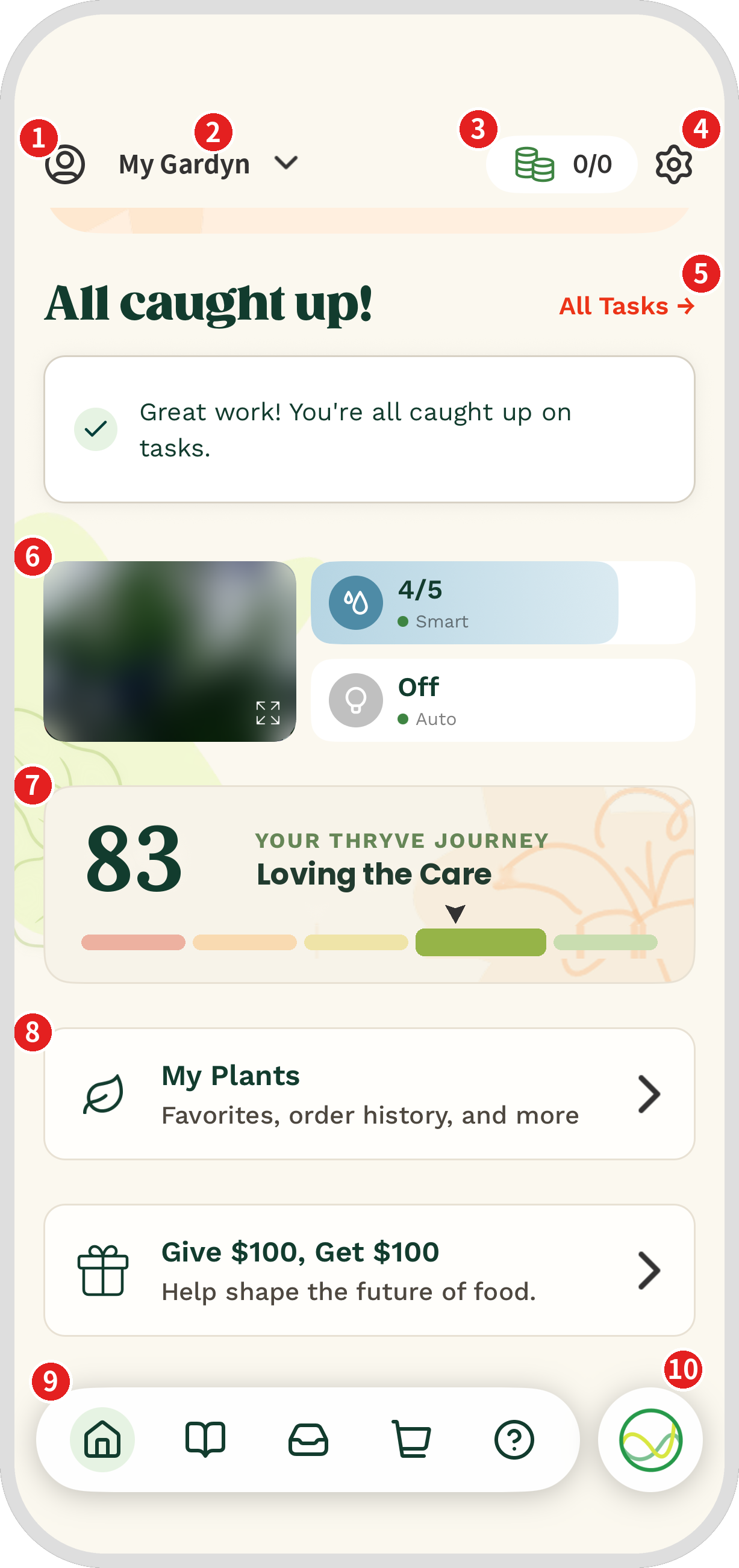
Welcome to your Gardyn app! Here’s a quick tour of the Home screen and where to find everything you need to help your Gardyn thrive.
Person icon: Open My Profile to manage your membership, orders, Autoship, Insights, and personal details.
Gardyn name: Switch between Gardyns or add a new one.
Credits: See how many plant credits you have available.
Gear icon: Open Settings for your light and water schedules, Vacation Mode, SOW Date, and device details.
All Tasks: See everything Kelby has asked you to do, plus your task history.
Live View, Watering and Lighting and tiles: Check in on your plants and manage your light and water.
Thryve Score: Tap to see your Thryve Journey and Kelby’s advice in Insights.
My Plants: Find your favorite plants, order history, and more.
Navigation bar: Jump to Home, Journal, Inbox, Shop, or Help.
Kelby: Chat with Kelby for instant answers to your questions.
Questions? Reach us at support@mygardyn.com or chat with us. We're here to help!